Contents
Almost every modern Shopify theme ships some structured data. That is the sentence that stops most merchants from looking any further, and it is why so many stores have schema markup that validates perfectly and describes almost nothing.
Shopify schema markup is the least glamorous item on any Shopify SEO list and one of the few with a mechanical, checkable outcome. The gap is not between having markup and not having it. It is between a Product block with three fields in it and one with ten. An answer engine reading the first one learns that something costs £148 and is in stock. It does not learn who makes it, what it is called by anyone other than you, or whether a single person has ever rated it.
What is schema markup on a Shopify store?
Schema markup is a block of machine-readable facts you attach to a page, written in a shared structured data vocabulary published at schema.org. It does not change what a shopper sees, and no ecommerce store gets a ranking for having it. What it changes is whether a machine reading the page can state, without guessing, what you sell — which is the precondition for being named in an AI answer rather than merely indexed. It tells a parser that the string "£148.00" is a price, that "Aro" is a brand, and that the page is about a product rather than an essay about one.
There are three formats. JSON-LD is a script tag containing the facts as JSON, sitting apart from the visible HTML. Microdata and RDFa weave attributes into the markup itself. Google supports all three and recommends JSON-LD, and for a Shopify store that recommendation is easy to follow: JSON-LD is a block you render once in a template rather than a change to every element on the page.
Does Shopify add schema markup automatically?
Every guide to Shopify structured data, this one included, will tell you what the default themes emit. Treat all of them as approximate. Themes change between versions, merchants edit them, and apps inject their own blocks. The lists in circulation do not agree with each other, which should tell you something.
So do not take anyone's word for it. Take ninety seconds and check:
- Open a product page on your shopify store and view the page source.
- Search it for
application/ld+json. Every block of structured data on the page is inside one of those script tags. - Read the fields. Not the field names — the values.
That third step is the one people skip. A Product object with "brand": "" counts as present in every audit tool that checks for the presence of product markup, and answers no question at all.
Most Shopify merchants find the theme has done something. Schema automatically appears on product pages without anyone configuring it, which is exactly why the shallow version goes unnoticed for years. What you will typically find on a default install is a Product block with a name, a price, a currency and an availability flag, plus Organization and BreadcrumbList somewhere in the head. What you will typically not find is brand, SKU, GTIN, or any rating or review data — because Shopify does not have that information unless you have given it to Shopify, and a theme cannot invent it.
Does schema markup help you get cited by AI?
This is where most articles reach for a statistic about how much schema improves AI visibility. The numbers in circulation — 2.5x more answers, 40% more overviews — trace back to vendor blogs with no published method, so they are not repeated here.
There is one real study. Kurt Fischman's cross-platform analysis collected 730 AI citations across 75 commercial queries on ChatGPT and Gemini, and asked whether schema presence predicted whether a page got cited. The headline finding is a null result: once the control set was corrected and errors were clustered by query, the association disappeared (OR 0.678, p = .296). Pages that were cited and pages that were not had statistically indistinguishable rates of schema — 43.1% against 44.8%.
That sounds like an argument for skipping structured data. It is the opposite, because of the exception. Pages carrying Product or Review markup with populated concrete attribute fields — pricing, aggregateRating, specifications — were cited at 61.7%, against 41.6% for pages carrying generic types like Article, Organization or BreadcrumbList. That difference held up (p = .012).
The caveats matter and most write-ups drop them. It is a preprint, it tested two specific model versions, and it covers commercial queries only. But the shape of the finding is consistent with how retrieval works: a parser cannot use a field that has no value in it, and "this page has schema" was never the useful question.
The practical reading for a shopify store: adding schema markup is not the win. Filling it is. Implementing schema on a product with no brand, no SKU and no reviews produces a valid block that answers nothing.
How do you add schema markup in Shopify?
| Theme code | Schema app | Manual per page | |
|---|---|---|---|
| Effort to set up | An hour, once | Minutes | Minutes per page |
| Scales to new products | Yes, automatically | Yes | No |
| Reads live product data | Yes, via Liquid | Yes | No — values go stale |
| Survives a theme update | Only if you re-apply it | Yes | Yes |
| Cost | None | Monthly | None |
| Risk | A Liquid error breaks the block | Duplicate blocks | Values drift from reality |
You can implement schema markup three ways, and the right choice depends less on budget than on who maintains the store.
Theme code is the route worth taking for product schema markup, because Liquid already has the product object to hand. You render the values rather than typing them, so the markup cannot disagree with the page. The cost is that a theme update can overwrite your work, so keep the snippet in a file of its own and re-include it after upgrades.
A schema app from the Shopify app store is the pragmatic choice if nobody on the team edits Shopify Liquid. You install the app, point it at your product template, and it will generate schema for every page from then on — which is the real argument for using a shopify app rather than writing structured data manually, because writing schema markup manually across a catalogue is not a task that ends. Any app like this generates the blocks for you and keeps them current.
Two warnings. Check what it writes, because an app that adds a second Product object to a page that already has one gives parsers two answers to the same question. And prefer one that writes into the server-rendered page rather than injecting after load — Google is explicit that dynamically generated markup makes shopping crawls less frequent and less reliable.
Manual per page means pasting a block of structured data code into a single page's HTML to add structured data one URL at a time. It is fine for a handful of fixed pages — an about page, a shipping policy — and wrong for products. Hand-written values go stale the first time a price changes.
What should the Product JSON-LD contain?
This is the JSON-LD markup worth shipping, in a snippet you include from your product template. It renders the fields Shopify does have, and only outputs the rating when one exists — a fabricated aggregateRating is both a schema.org misuse and a manual action risk.
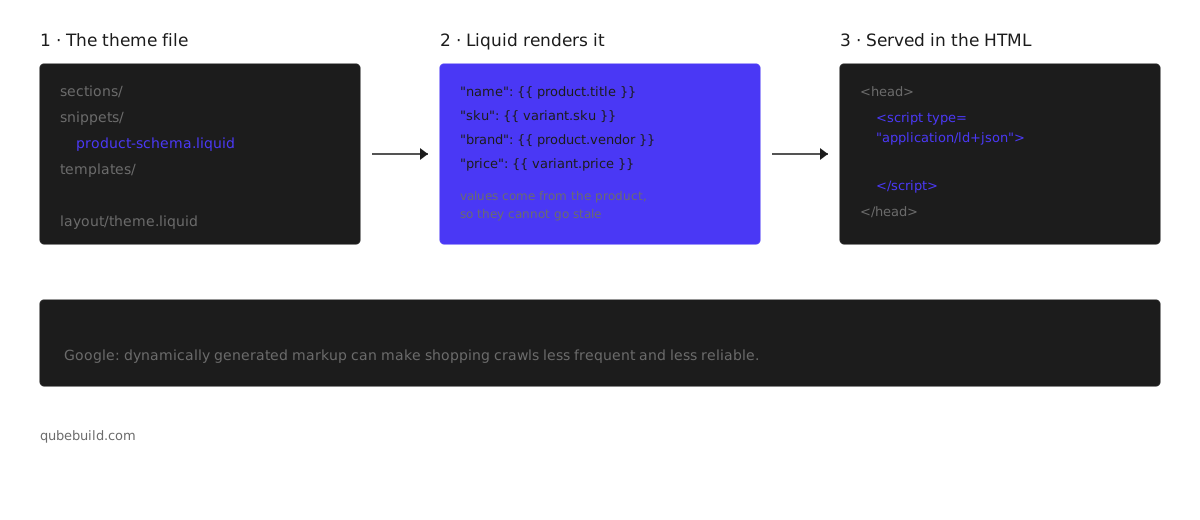
{% raw %}<script type="application/ld+json">
{
  "@context": "https://schema.org/",
  "@type": "Product",
  "name": {{ product.title | json }},
  "description": {{ product.description | strip_html | truncate: 300 | json }},
  "image": {{ product.featured_image | image_url: width: 1200 | prepend: "https:" | json }},
  "sku": {{ product.selected_or_first_available_variant.sku | json }},
  {% if product.selected_or_first_available_variant.barcode %}
  "gtin": {{ product.selected_or_first_available_variant.barcode | json }},
  {% endif %}
  "brand": {
    "@type": "Brand",
    "name": {{ product.vendor | json }}
  },
  {% if product.metafields.reviews.rating_count > 0 %}
  "aggregateRating": {
    "@type": "AggregateRating",
    "ratingValue": {{ product.metafields.reviews.rating.value | json }},
    "reviewCount": {{ product.metafields.reviews.rating_count | json }}
  },
  {% endif %}
  "offers": {
    "@type": "Offer",
    "url": {{ request.origin | append: product.url | json }},
    "priceCurrency": {{ cart.currency.iso_code | json }},
    "price": {{ product.selected_or_first_available_variant.price | divided_by: 100.0 | json }},
    "availability": "https://schema.org/{% if product.selected_or_first_available_variant.available %}InStock{% else %}OutOfStock{% endif %}"
  }
}
</script>{% endraw %}
Two notes on the schema code. The json filter is doing real work: it escapes quotes and apostrophes that would otherwise break the block, and a product called 5" Chef's Knife will break it without them. And the review metafield path assumes Shopify's own reviews; a third-party review app stores ratings somewhere else, and you will need its namespace instead.
What is Organization schema, and why does it matter?
Product markup describes an item. Organization schema describes you, and it is the block that answers "who is this store" for an engine that has never encountered your brand. It belongs in theme.liquid so it renders on every page of the shopify website.
The field that earns its place is sameAs, a list of URLs pointing at your social profiles and any external page that unambiguously refers to your business. It is the closest thing structured data has to saying this brand here and that account there are the same entity — which is exactly the question an answer engine has to resolve before it can attribute anything to you.
{
  "@context": "https://schema.org/",
  "@type": "Organization",
  "name": "Aro",
  "url": "https://aro.example",
  "logo": "https://aro.example/logo.png",
  "sameAs": [
    "https://www.instagram.com/aro",
    "https://uk.trustpilot.com/review/aro.example"
  ]
}
What about collection pages, articles and video?
A shopify collection page lists products, and the schema type that describes a list is ItemList — an ordered set of entries pointing at the product URLs on the page. It is genuinely useful and almost nobody adds it. Collection schema will not produce rich snippets on its own; what it does is make the relationship between a category and its products explicit rather than something a crawler has to infer from your markup code.
For the shopify blog, Article schema with a real author and datePublished is the whole job. If you sell to people who research before buying, those posts are frequently the pages an engine retrieves, and article schema is what tells it when the content was written — a question that matters more every year.
Video schema is worth adding if you host product video, because video results are a search result type most stores never compete for.
When is FAQ schema a violation?
FAQ schema describes a frequently asked questions block. The rule is simple and widely broken: the questions and answers must be visible on the page to a person.
Review schema has the same rule and the same trap: mark up reviews that a visitor can read, and nothing else. Use schema markup here only for questions already on the page, and it is one of the better schema types to consider for a product page, because the questions buyers actually ask — sizing, delivery, returns — are the questions engines get asked too.
How do you test that your schema markup works?
Three tools, and each one catches what the last one cannot.
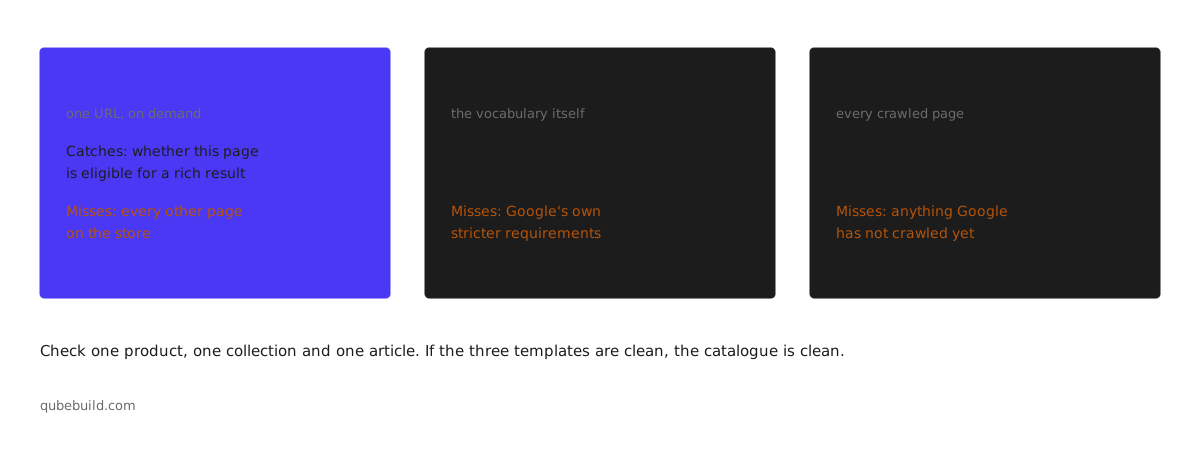
Google's Rich Results Test takes a URL or a block of code and tells you which rich results the page is eligible for. It is the fastest way to confirm a change landed. If you are building a block from scratch, Google's Structured Data Markup Helper will generate a first draft you can then move into Liquid.
Between them these confirm the schema markup works before you rely on it. The schema.org validator checks the vocabulary itself rather than Google's requirements, which makes it the better tool when you are using structured data types Google has no rich result for — ItemList being the obvious case.
Google Search Console is the one that matters, because it reports on pages Google has actually crawled rather than on a URL you asked it to look at. Its enhancement reports will show errors across every page with schema on your store, which is the only view that catches the product where one variant has no price.
Check one product, one collection and one article. If those three are clean, the templates are clean, and your schema setup is done until the next theme update.
None of this tells you whether the markup changed anything commercially. That is a separate measurement — and one that varies by where you measure from. Confusing the two is how SEO work gets defended with the wrong evidence: a page can be eligible for every rich result Google offers and still be absent from the answers buyers actually read.
What will structured data not do?
It is not a ranking signal in the way merchants hope. Google has been consistent that structured data helps search engines understand a page and makes it eligible for rich results; eligibility is not a promise, and Google decides what to show. Adding schema to a thin page makes a thin page legible, not good.
It will not fix a product page with no unique description, and it will not make an engine cite a store it has no other reason to trust. When a competitor is named and you are not, the cause is usually somewhere else entirely. The study above is the honest version of this: markup is a precondition for being parsed correctly, not a cause of being chosen.
What it does do is remove ambiguity. For a store competing against marketplaces that publish complete product data as a matter of course, that is not a small thing.
Frequently asked questions
Does Shopify add schema markup automatically?
Partly. Modern themes output a Product block on product pages and usually Organization and BreadcrumbList alongside it, so schema appears automatically without any setup. What is not automatic is the content: brand, SKU, GTIN and ratings are only present if the underlying product data exists in Shopify and the theme has been told to render it. Check your own source rather than relying on any published list.
Do I need an app to add schema markup to Shopify?
No. A dedicated schema app is a convenience, not a requirement, and theme code gives you more control and no monthly cost. Use an app if nobody on the team is comfortable editing Liquid, or if you want the markup to survive theme updates without anyone remembering to re-apply it.
Will schema markup get my store cited by AI?
Not on its own. The one published study on this found schema presence did not predict citation across ChatGPT and Gemini. What did correlate was Product and Review markup with real values in the concrete fields. So the useful goal is complete product data, not the presence of a script tag.
What is the difference between product snippets and merchant listings?
They are two different Google experiences from the same Product type. Product snippets are for pages where someone cannot buy directly and lean on review information. Merchant listings are for pages where the purchase happens, and support detailed retail fields like sizing, shipping and returns. A Shopify product page is a merchant listing.
Can I have too much schema on a page?
You can have contradictory schema, which is worse. Two Product objects on one page — usually a theme block plus an app block — leave a parser to choose. Duplication is the most common problem after emptiness, and it is the first thing to look for after installing anything that writes markup.
Does structured data need to be in the page source, or can JavaScript add it?
Put it in the initial HTML. Google states plainly that dynamically generated markup can make shopping crawls less frequent and less reliable. On Shopify this is straightforward, because Liquid renders server-side by default — the failure mode is an app that injects its block after load.
How long until rich snippets appear?
Days to weeks, and never guaranteed. Google has to recrawl the page, decide the markup is trustworthy, and decide the rich result is worth showing for the query. Rich results test passing on day one and nothing changing in the SERP for a fortnight is normal, not a sign of a broken implementation.
Where to start
Open one product page and read its JSON-LD. Not the audit summary — the actual values.
If brand is empty, or there is no sku, or aggregateRating is missing on a product with two hundred reviews sitting on the page, you have found the work. If the whole catalogue needs it, that is an ecommerce SEO engagement rather than an afternoon. It is not adding markup to your shopify store. It is finishing what is already there.